
In this guide
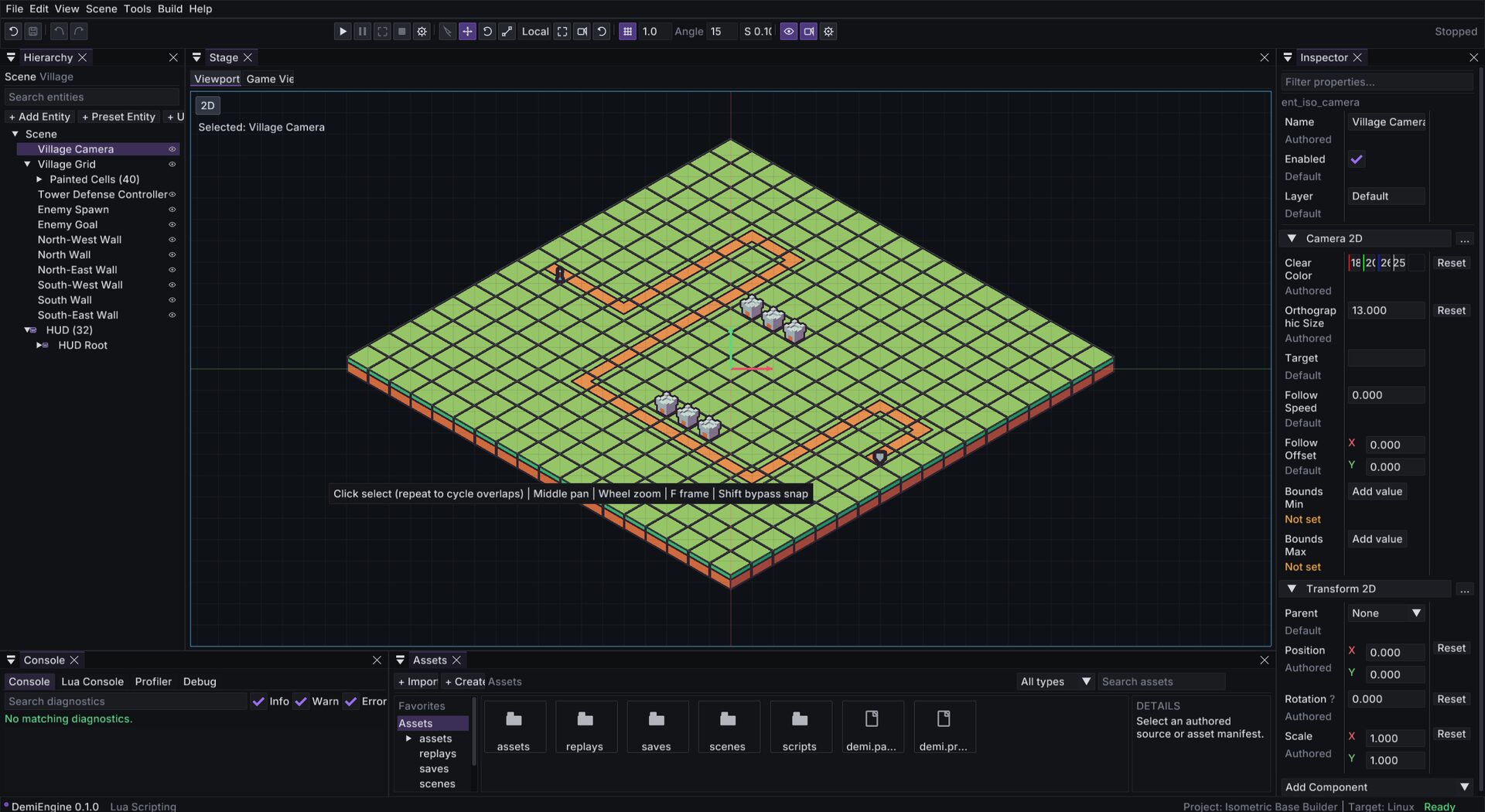
Native scene, HUD, and prefab workspace with Inspector, Undo, and Play.
Editor
The native editor is a workspace over the same source documents the CLI and runtime use. Scene and HUD editing are integrated workspace documents — there is no second unsynchronized preview model and no modal JSON-only HUD editor.
Launch
demi editorLaunched with no project, the editor opens a start dialog for recent and discovered projects.
Workspace
Docking uses the pinned Dear ImGui docking branch in the main native window. EditorDockingWorkspace owns the dock graph and default layout; panels use stable window IDs and derive rendering/input rectangles from their live content region.
Scene stage
Click a registered scene source to switch the active scene. Edit hierarchy, transforms, and components.
HUD stage
Click a HUD source to open the HUD stage with the same hierarchy, viewport, selection, Inspector, Undo/Redo, Save, diagnostics, and recovery paths.
Prefab stage
Edit reusable entity compositions and UI prefabs with per-instance overrides.
Asset folders
Browse imported assets, manifests, and dependencies.
Core panels
- Hierarchy — stable-ID entity tree with
childrennesting. Drag to reparent within the same transform domain. - Inspector — edit component fields and Lua script properties. Add or remove components per entity.
- Viewport — authored Scene/HUD and embedded Game views render to GPU targets displayed as ImGui images. Docked viewports never write directly into the backbuffer (dock-node backgrounds composite later).
- Diagnostics — the same validation codes as
demi validate. - Profiler — CPU/RAM and Lua heap overview, plus frame-time and subsystem scopes during Play.
Commands and safety
- Scene mutations are command-like, reversible, validated, and keyed by stable IDs.
- Undo/Redo covers scene, HUD, and prefab edits.
- Failed preview rebuilds restore the document and history.
- Saves patch source with small diffs and normalize float noise without reformatting the document.
- Atomic/conflict-aware save behavior is required; never trade small reviewable diffs for whole-document serialization.
Play mode
Play owns an isolated runtime world. Hierarchy, debug, and profiler state from Play must not silently mutate authored scene data. Stop Play to return to the authored document.
Dock layout and UI scaling
Dock layout and panel visibility are per-user state under the platform data directory. They never enter a project, generated content, packages, authored undo history, or runtime state. Editor UI scaling is adjustable for high-DPI displays.
Editor and CLI share services
The editor uses the same loaders, metadata, diagnostics, importer, BuildService, cook, and package paths as the CLI/runtime. If the editor accepts a document, demi validate accepts it too.
Continue
- Project & file formats
- UI & HUD for HUD stage details
- Testing & debugging