
In this guide
- Models & meshesglTF models, LOD, instancing, and procedural meshes.
- Terrain generation & editingGenerate heightfields, paint biomes, sculpt adjustments and preserve edits across regeneration.
- CharactersCharacterController3D movement, slopes, and jumps.
- Lights & cameraLighting, environment, and screen/world conversion.
- DestructionFracture authoring, impacts, and debris.
Models, characters, lights, destruction, denting, and cameras.
3D gameplay
Lightweight 3D covers glTF models, GPU skinning, Jolt physics, characters, localized destruction, denting, lights, and panorama skies.
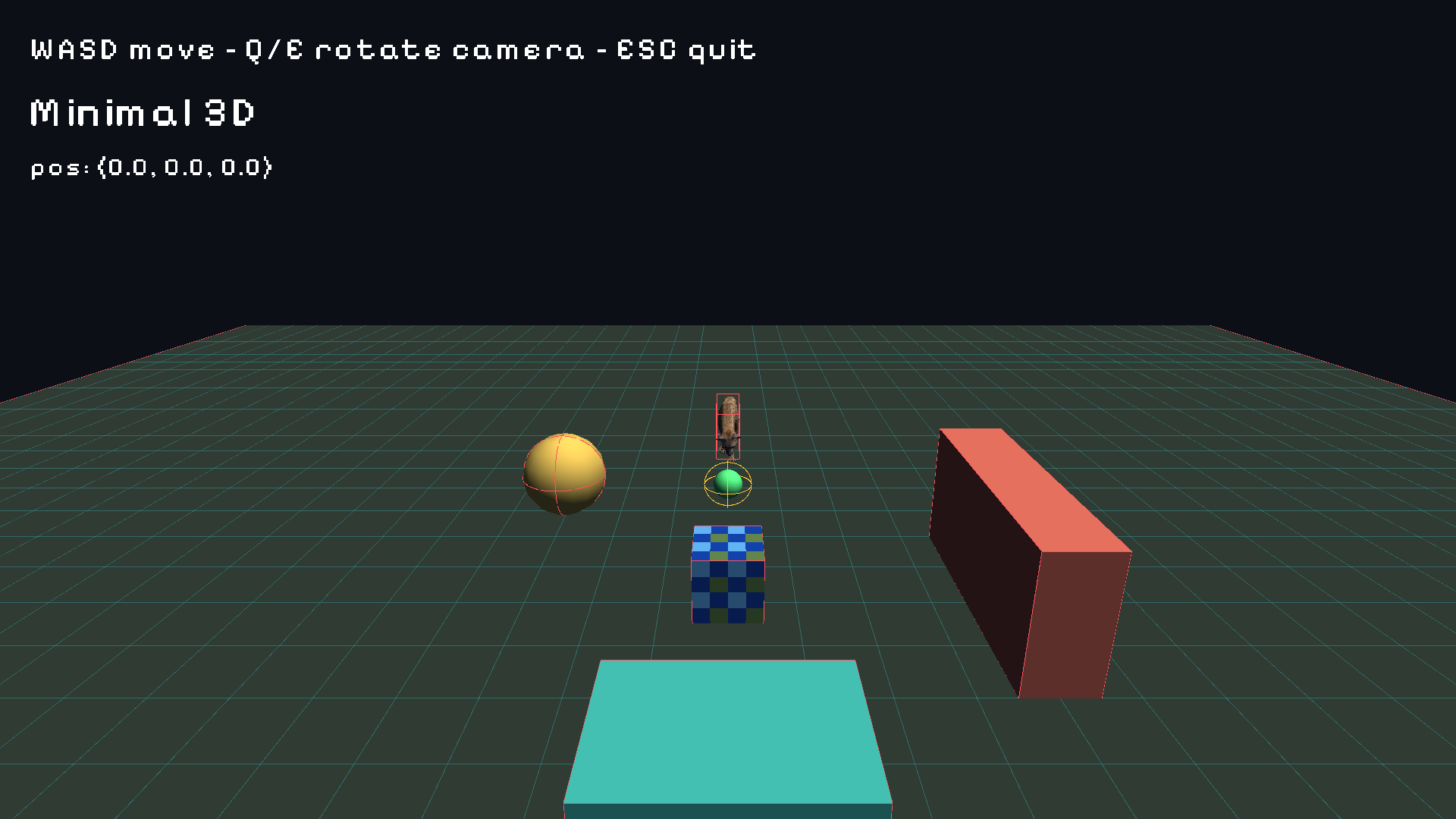
MeshRenderer models on a ground plane, with the collider and grid debug overlays enabled.Models and meshes
{
  "Transform3D": { "position": [0, 0, 0], "rotation_euler": [0, 0, 0] },
  "MeshRenderer": {
    "model": "asset://models/hero",
    "medium_lod_model": "asset://models/hero_med",
    "low_lod_model": "asset://models/hero_low"
  }
}- Use glTF/GLB for renderable
Model3Dassets. The importer recognizes additional extensions, but the current renderer's geometry loaders use glTF/GLB; see Models & meshes. - LOD models are separate authored models that share clip names and durations.
MeshInstances3Ddraws many copies of one model efficiently.WorldText3Dplaces world-space labels.demi.mesh.proceduralanddemi.voxel.worldbuild runtime geometry.
local Proc = require("demi.mesh.procedural")
local mesh = Proc.create()
mesh:add_vertex(0, 0, 0, 0, 0, 1, 0, 0)
mesh:add_vertex(1, 0, 0, 0, 0, 1, 1, 0)
mesh:add_vertex(0, 1, 0, 0, 0, 1, 0, 1)
Proc.apply(entity_id, mesh)   -- attach a built mesh to an entity
The builder (mesh:clear(), reserve, add_vertex, add_quad, add_voxel_blocks, add_voxel_heightfield) accumulates geometry that Proc.apply uploads.
Skeletal animation
AnimationPlayer3D plays clips imported from the glTF/GLB. Use the animated_character import preset or enable settings.model_import.import_animations. settings.animations.clips is manifest metadata, not a clip importer or renaming mechanism. Visual LOD holds poses beyond visual_update_distance and refreshes at visual_update_rate.
Vulkan GPU skinning is applied automatically for supported models. Set DEMI_GPU_SKINNING=0 to force the CPU path while profiling.
Procedural leg IK:
local Animation = require("demi.animation")

local solved = Animation.solve_two_bone_3d({
    root = hip, target = footTarget, pole = kneeHint,
    upper_length = 0.45, lower_length = 0.45,
})
-- solved.joint          → knee position {x, y, z}
-- solved.end_position   → solved foot position {x, y, z}
-- solved.reached        → boolean, false when the target is out of range

Animation.set_bone_segment(id, "leg_l", {
    start = hip, tail = foot, pole = kneeHint,
})
Animation.clear_bone_segments(id)
Mesh surfaces
Use MeshRenderer.metallic, roughness, opacity and surface_mode for per-entity surface overrides. Omission inherits the assigned Material asset or the built-in defaults. These controls affect the shared built-in lit path in the editor and runtime, not an editor-only preview.
"MeshRenderer": {
  "shape": "cube",
  "color": [0.5, 0.85, 1, 1],
  "metallic": 0,
  "roughness": 0.1,
  "opacity": 0.25,
  "surface_mode": "transparent"
}
Surface modes are opaque, transparent and additive. Metallic, roughness and opacity must be finite numbers from 0 to 1. Shared Material assets supply these values under parameters, with alpha blending selected through render_state.blend: "alpha". Existing material_properties can override the built-in scalar parameters; explicit Mesh Renderer fields take precedence.
local Entity = require("demi.entity")
Entity.set_field("window", "MeshRenderer", "surface_mode", "transparent")
Entity.set_field("window", "MeshRenderer", "opacity", 0.25)
This is direct metallic/roughness lighting and alpha blending. Glass refraction, reflected environments and general PBR texture maps are not provided by these controls. Arbitrary per-entity custom-shader uniform overrides are not covered by the built-in surface resolver.
Inline meshes can supply vertex_colors: one normalized RGBA array per vertices entry, or an empty array for white. The GPU interpolates these colours and multiplies them by mesh tint, material base colour and texture; vertex alpha also multiplies opacity. This reusable field supports painted meshes and depth-graded water. In the Inspector it is an advanced geometry buffer. Changing vertex count requires clearing or replacing the matching colour buffer too. Native generators must call markGeometryChanged() after editing buffers; reflected edits invalidate them automatically.
Characters
{
  "CharacterController3D": {
    "slope_limit": 45,
    "step_height": 0.35,
    "skin_width": 0.02,
    "gravity": -18.0
  },
  "BoxCollider3D": { "size": [0.6, 1.8, 0.6], "offset": [0, 0.9, 0] }
}
local Character = require("demi.physics.character_controller3d")
Character.set_velocity(id, vx, 0, vz) -- horizontal intent; physics owns Y
Character.jump(id, 6) -- upward jump speed in metres/second
local state = Character.state(id)
-- state.grounded boolean
-- state.velocity {x, y, z}
-- state.ground_entity supporting entity ID- Requires exactly one non-trigger primitive/convex collider on the same root, and no
Rigidbody3D. - Handles slopes up to
slope_limit(degrees), steps up tostep_height, and wall slide. - Inherits velocity from moving platforms.
- Buffer jump input in Lua if needed. The current native step applies a queued jump only while grounded; it does not expose an airborne coyote-time override.
Camera3D
local Camera3D = require("demi.camera3d")

local ray = Camera3D.screen_ray(id, mx, my, viewport_w, viewport_h)
if ray then
    -- ray.origin and ray.direction are Vec3 tables.
    -- This constructs a ray; it does not query physics or return a hit.
end

local screen = Camera3D.world_to_screen(id, x, y, z, viewport_w, viewport_h)
-- screen.x / screen.y, or nil outside the camera's near/far depth

local wx, wy, wz = Camera3D.screen_to_world(id, mx, my, viewport_w, viewport_h, 10)
-- World point 10 metres along the normalized screen ray.
Always pass the viewport size — the camera does not assume a resolution. Screen coordinates have the origin top-left with +Y down. orthographic_size is the full visible height; FOV is in degrees. Transform3D.look_at resolves the parent chain before aiming.
Third-person and orbit cameras ship in the demi.gameplay.third_person package.
Lights, environment, and effects
DirectionalLight,PointLight,SpotLight— local and directional lighting.Environment3D— tone-mapped panorama skies.PostProcessStack— post effects.ParticleEmitter3D— 3D particles.SurfaceRelief3D— height-map surface relief.Dentable3D— opt-in mesh denting.
local Deform = require("demi.mesh.deformation")

local accepted, error = Deform.dent(id, {
    point = {x = x, y = y, z = z},
    direction = {x = 0, y = 0, z = -1},
    radius = 0.32, depth = 0.08,
})
-- For physics-driven dents, pass the collision event's contact record:
-- Deform.impact(id, contact, optional_material_overrides)
-- The record supplies point_x/y/z, normal_x/y/z and impact_energy (joules).
Deform.reset(id) -- restore this instance's original visual mesh
Denting is visual only — combine it with destruction or gameplay events for physical consequences.
Directional shadows
Enable casts_shadows on a DirectionalLight. Shadow quality is configured on an enabled Environment3D component, using the same settings in the editor Viewport and the running game. Light intensity changes illumination, not the size or resolution of the shadow.
{
  "DirectionalLight": {
    "direction": [-0.5, -0.7, -1],
    "intensity": 3,
    "casts_shadows": true
  },
  "Environment3D": {
    "shadow_distance": 80,
    "shadow_resolution": 1024,
    "shadow_cascades": 4,
    "shadow_split_lambda": 0.85,
    "shadow_blend": 0.1,
    "shadow_filter": "pcf",
    "shadow_bias": 0.005
  }
}
These are the default shadow-quality settings. Cascades divide the camera's visible depth range, allocating finer shadow detail near the camera. Each cascade is fitted to its camera slice and snapped to shadow texels to reduce shimmering. Neighboring cascades overlap and blend, and the last fades out at the shadow distance.
| Property | Meaning |
|---|---|
shadow_distance | Maximum receiver depth along the camera's forward direction, in metres, also bounded by its far clip. Zero disables shadows. This now describes visible depth, not the older map's coverage radius. |
shadow_resolution | Resolution of each square cascade. Four 1024-pixel cascades occupy one 2048×2048 atlas. The device's texture-size limit applies to the whole atlas. |
shadow_cascades | 1–4 cascades; the current shader has four slots. More cascades improve nearby detail but add geometry passes. Three and four cascades use the same 2×2 atlas allocation, while three saves one geometry pass. |
shadow_split_lambda | 0–1. Balances uniform and logarithmic perspective-camera splits; larger values concentrate resolution nearby. Orthographic cameras use uniform splits. |
shadow_blend | 0–1. Fraction of each depth interval used for transitions. Zero produces a hard boundary; larger values increase overlap and transition-sampling work. |
shadow_filter | pcf smoothly interpolates neighboring depth comparisons instead of producing stepped bands. hard uses one comparison for sharper, cheaper shadows. PCF softness is filtering, not physically sized area-light shadows. |
shadow_bias | Depth offset in metres. Increase slightly for self-shadow speckles; reduce if shadows detach from objects. A large bias does not fix coarse shadow resolution. |
max_shadow_lights | Zero disables the pass. Only the primary directional light casts shadows; increasing this does not add point/spot shadows. |
The builtin receiver also applies an automatic normal offset scaled to each cascade’s world-space texel size and filter footprint. This suppresses self-shadow grids across adjacent facets; it is separate from shadow_bias. Very close contacts can soften or detach within that footprint, especially with coarse distant cascades. Tighter coverage or higher resolution reduces the offset in world units.
For a small room or close-up prop, shorten the distance before increasing resolution. For a large level, keep cascades enabled rather than spreading one map over the whole level. On lower-cost targets, try two cascades or a smaller per-cascade resolution and measure the result. A larger atlas consumes memory even if the scene contains only a few objects.
Shadow geometry updates each rendered frame, including moving rigid fragments, built-in mesh denting and supported skeletal meshes. Custom vertex-deformation shaders and point/spot shadows are not covered by this implementation. The renderer reports Renderer3D.shadow_cascades and Renderer3D.shadow_batches for inspection.
Implementation background: Microsoft's cascaded shadow maps overview.
Destruction
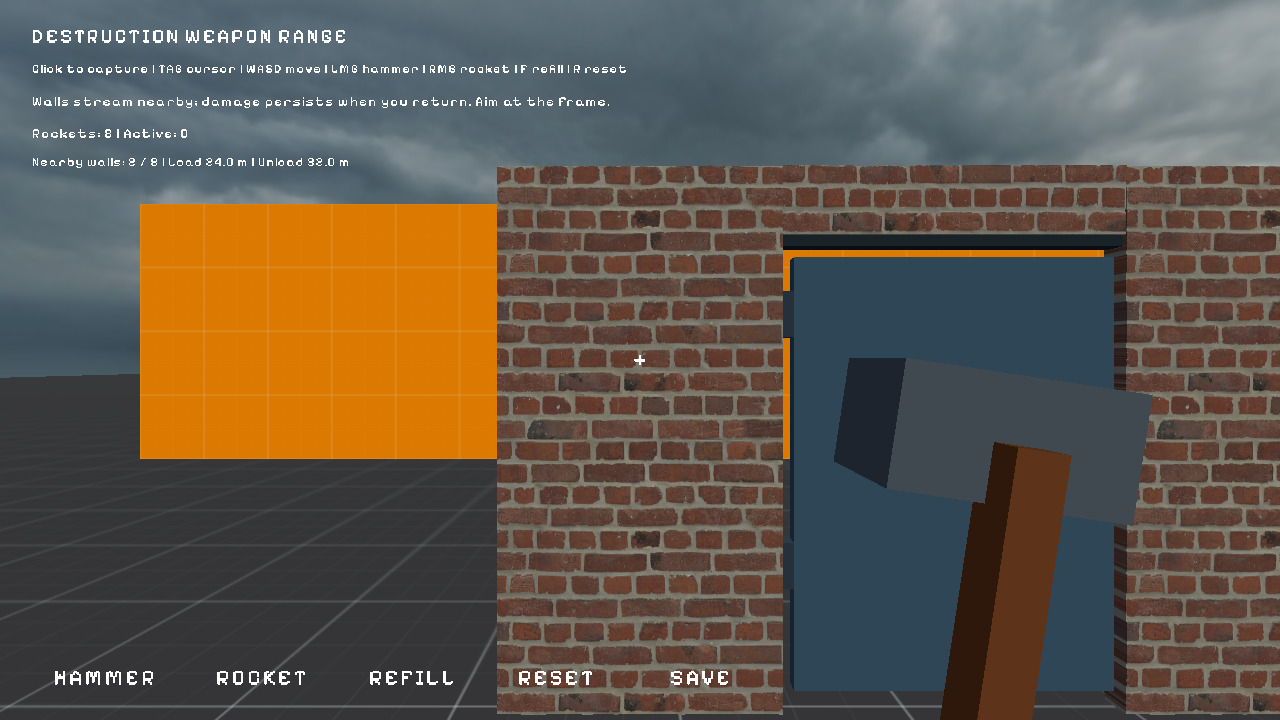
Author fracture on ordinary prefabs. Native Blast/Jolt handles impacts and connected fragments.
Fracture3Don mesh children describes how a mesh splits.Masonry3Ddescribes repeated brickwork with material density.Destructible3Downs the assembly and runtime splitting.FractureDebris3Dcovers cosmetic debris cleanup.
local Destruction = require("demi.physics.destruction3d")

local accepted, error, affected = Destruction.impact({
    entity = id, position = {x = x, y = y, z = z},
    radius = 0.5, energy = 200, impulse = 20,
})
Destruction.damage_part(id, part, amount)

local state = Destruction.state(id)
-- status, error, revision, bodies, and part-to-entity mappings

local checkpoint, error = Destruction.checkpoint(id)
-- Restore on a fresh attached assembly; queued changes must have committed.
if checkpoint then Destruction.restore(fresh_id, checkpoint) end
Destruction.retire_debris(id) -- retire detached physical groups
Optional gameplay packages add weapons and proximity streaming. Runnable labs: destruction_3d_lab, destruction_weapons_3d_lab, fracture_prefab_lab.
Transforms
local T = require("demi.transform3d")
local x, y, z = T.get_position(id)     -- local-space scalars
local wx, wy, wz = T.get_world_position(id) -- resolves parent transforms
T.set_rotation(id, rx, ry, rz)         -- Euler radians
T.set_scale(id, sx, sy, sz)
local fx, fy, fz = T.forward(id)       -- world-space unit vector
T.look_at(id, tx, ty, tz)              -- aim at a world point
Getters return separate numbers and nil per coordinate when the entity or component is missing.