
In this guide
Sprites, animation, tilemaps, cameras, isometric grids, and render order.
2D & isometric
The 2D stack is the production focus: sprites, cameras, animation, tilemaps, materials, particles, masks, nine-slice, and isometric placement.
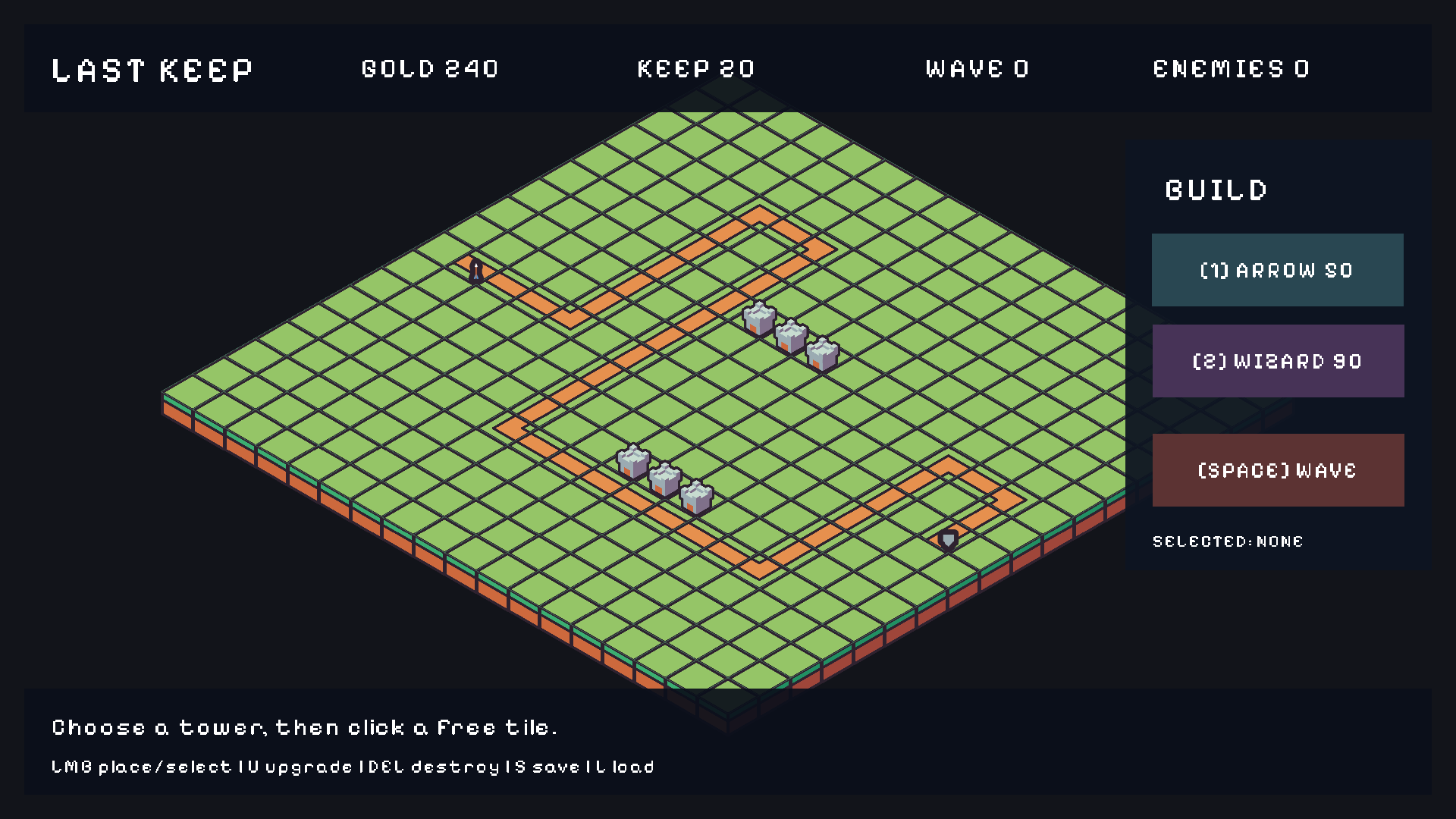
Tilemap2D/IsoGrid, sprite towers, and a HUD tree drawing the counters and build panel.Sprites
{
  "Sprite": {
    "texture": "asset://sprites/hero",
    "source_position": [0, 0],
    "source_size": [32, 32],
    "size": [1, 1],
    "pivot": [0.5, 0],
    "flip_x": false,
    "color": [1, 1, 1, 1],
    "layer": "characters",
    "sorting_order": 10,
    "material": "asset://materials/additive",
    "nine_slice": [[2, 2], [2, 2]],
    "mask_offset": [0, 0],
    "mask_size": [1, 1]
  }
}source_positionandsource_sizetake a sub-rectangle of the texture ([x, y]and[w, h]); setsource_normalized: trueto use 0…1 coordinates instead of pixels.sizeis world extent;pivotis the origin inside the sprite (0.5 centers X).nine_sliceis[[left, top], [right, bottom]]border widths for stretchable panels.mask_offset/mask_sizeclip the sprite — useful for health bars and portrait frames.- Draw order:
sorting_order, thenlayername, then isometric depth. - Transparent sprites need alpha in the source (PNG recommended).
local Sprite2D = require("demi.sprite2d")

Sprite2D.set_color(id, 1, 0.4, 0.4, 1)       -- RGBA scalars, 0…1
Sprite2D.set_flip(id, true, false)           -- flip_x, flip_y
Sprite2D.set_size(id, 1.5, 1.5)
Sprite2D.set_layer(id, "characters")
Sprite2D.set_sorting_order(id, 20)
Sprite2D.set_material(id, "asset://materials/additive")

Sprite2D.play_animation(id, "run")
Sprite2D.pause_animation(id)
Sprite2D.resume_animation(id)
local clip = Sprite2D.current_animation(id)  -- current clip name ("" when none)
Sprite animation
{
  "SpriteAnimator2D": {
    "frame_size": [32, 32],
    "clips": {
      "idle": { "start_frame": 0, "frame_count": 4, "fps": 8 },
      "run":  { "start_frame": 4, "frame_count": 6, "fps": 12,
                "events": [{ "time": 0.5, "name": "footstep" }] }
    }
  }
}
Frames count left-to-right across the sheet. A clip event fires sprite_animation when playback crosses time (normalized 0…1 within the clip):
Events.subscribe("sprite_animation", function(e)
    -- e.entity_id, e.clip, e.name, e.frame
    if e.name == "footstep" then Audio.play("asset://audio/step") end
end)
Alternatively declare an atlas to generate one clip per row:
{
  "SpriteAnimator2D": {
    "atlas": {
      "columns": 8, "rows": 3,
      "row_names": ["idle", "run", "jump"],
      "fps": 12, "loop": true
    }
  }
}
Explicit clips override the generated rows.
Animation state machines
AnimationStateMachine drives sprites and 3D clips with named states, parameters, and transitions. Details live in Animation & audio.
local Animation = require("demi.animation")

Animation.set_number(id, "speed", 1.2)     -- parameter used by transitions
Animation.set_bool(id, "grounded", true)
Animation.trigger(id, "jump")              -- one-shot transition trigger
local state = Animation.state(id)          -- current state name, or nil
Animation-timed collision
AnimationCollision2D defines named receiver volumes and state-time overlap windows. When a window is active and a receiver overlaps something, it emits animation_collision:
Events.subscribe("animation_collision", function(e)
    -- e.source_id, e.target_id, e.window, e.receiver
end)
The event is neutral — apply damage or knockback in your own script or with a gameplay package.
Camera2D
{
  "Camera2D": {
    "target": "player",
    "follow_speed": 4.0,
    "follow_offset": [0, 1],
    "bounds_min": [0, 0],
    "bounds_max": [40, 24]
  }
}
target is an entity ID. follow_speed of 0 snaps instantly; higher values ease toward the target. Bounds clamp the camera to the level.
Tilemaps
Author *.tilemap.json through a Tilemap2D asset, then place a Tilemap2D component with asset and pixels_per_unit. The map origin is at Transform2D.position (lower-left).
local Tilemap2D = require("demi.tilemap2d")

local id = Tilemap2D.get_tile(map, x, y)   -- tile ID (0 = empty)
Tilemap2D.set_tile(map, x, y, 17)          -- runtime override
Tilemap2D.clear_overrides(map)             -- restore authored tiles

local objects = Tilemap2D.objects(map, "spawns")
-- array of { id, type, x, y, properties } from the object layer

Tilemap2D.bake_navigation(map)             -- rebuild walkability after edits
Layers may carry collision, collision_layer, navigation_blocked, navigation_cost, parallax, and opacity. Tile ID 0 is empty; positive IDs are global one-based; row 0 is the top row.
Isometric placement
IsoTransform and IsoGrid handle isometric/2.5D placement. The demi.grid module exposes the placement grid:
local Grid = require("demi.grid")

print(Grid.available(grid))                -- boolean, grid is configured

local wx, wy = Grid.tile_to_world(grid, tx, ty)
local tx, ty = Grid.world_to_tile(grid, wx, wy)
local tile = Grid.get_tile(grid, tx, ty)   -- tile ID or 0
local occupant = Grid.entity_at(grid, tx, ty)  -- entity handle or nil

if Grid.can_place(grid, tx, ty) then       -- boolean
    Grid.set_preview(grid, tx, ty, 17)     -- ghost preview
end
Grid.clear_preview(grid)

local path, diagnostic = Grid.path(grid, from, to)
-- path is an array of {x, y}, or nil with a diagnostic table
2D physics and navigation
Bodies, colliders, joints, and queries are covered in Physics. Grid pathfinding:
local Navigation = require("demi.navigation")
local nav = assert(Navigation.create_grid(32, 32, 1))
nav:set_blocked(3, 4, true)
nav:set_cost(5, 5, 2)
local path, diagnostic = nav:path(0, 0, 10, 10)
-- Empty array on failure; diagnostic is a string such as PATH_GOAL_BLOCKED.
local cx, cy = nav:world_to_cell(4.5, 2.5)
local wx, wy = nav:cell_to_world(cx, cy)
nav:clear() -- disable this grid until configured again
Reusable Lua controllers ship as packages: demi.character_controller_2d, demi.top_down_controller_2d, demi.click_move_controller_2d.
Particles and masks
ParticleEmitter2D provides gameplay-driven 2D particles. Sprite masking clips a sprite to a sub-rectangle (health bars, minimaps, portraits). Nine-slice panels stretch without distorting borders. Debug overlays draw_order, grid, and ui_bounds show sorting and layout.